Bot Mode roster
Turn two souls into named Bots, give each a harness, run one @mention handoff, and keep a file receipt.
00of 12 sections behind you
How to read this lab
This is a drill, not a thirteenth lesson. You already have a profile and a soul (Harness 04). Read the four cards, then do Drill A and Drill B. Group chat and the stretch are extra.
- Come back to a card when Desktop names that word (Bots tab, @mention, group).
- Proof is a file you open offline — chat alone is not the receipt.
Why this lab
Harness 04 taught one profile, one soul. Bot Mode is the Desktop roster for those same profiles: a name, a face, a pinned model, isolated memory, and a way for Bots to pass work with @mentions. Build a specialist once; it is still there next week.
This is not a marketing department and not a second product. You stay the operator. Delivery between Bots is fire-and-forget: the teammate answers in its own Bot Chat when it next runs.
 Open on X
 Core words
Four lines name almost everything in this drill. The rest is how you click it.
Bot
A named Hermes profile in the Desktop roster: own soul, model, memory, skills, and chat. Files still live under ~/.hermes/profiles/<name>/.
Harness (per Bot)
The six knobs this specialist is allowed: soul, model pin, skills, tools, memory, face. Shared notes are the company brain; MEMORY.md stays per Bot.
Canonical Bot Chat
The forever-chat created when the Bot is born. /new there compacts context; it does not fork a new relationship.
@mention / handoff
Type @researcher have a look. The sending Bot composes its own message. Delivery is fire-and-forget: the reply lands later in the teammate’s Bot Chat.
A Bot is a profile
There is no new primitive. The Bots tab is a UI over profiles you already made. CLI parity: hermes -p researcher chat is the same agent. If you ran the Kanban lab, those profiles are already Bots — give them faces and a handoff.
- New Agent is three fields (Name, Title, Description). Advanced opens clone, model pin, SOUL.md, and per-skill / per-toolset ticks.
- Routines are ordinary cron jobs named
[bot:<name>] …— they also show inhermes cron list. - If the Bots tab is missing: Settings → Plugins → Bots, then a current Desktop build. The old standalone plugin repo is archived.
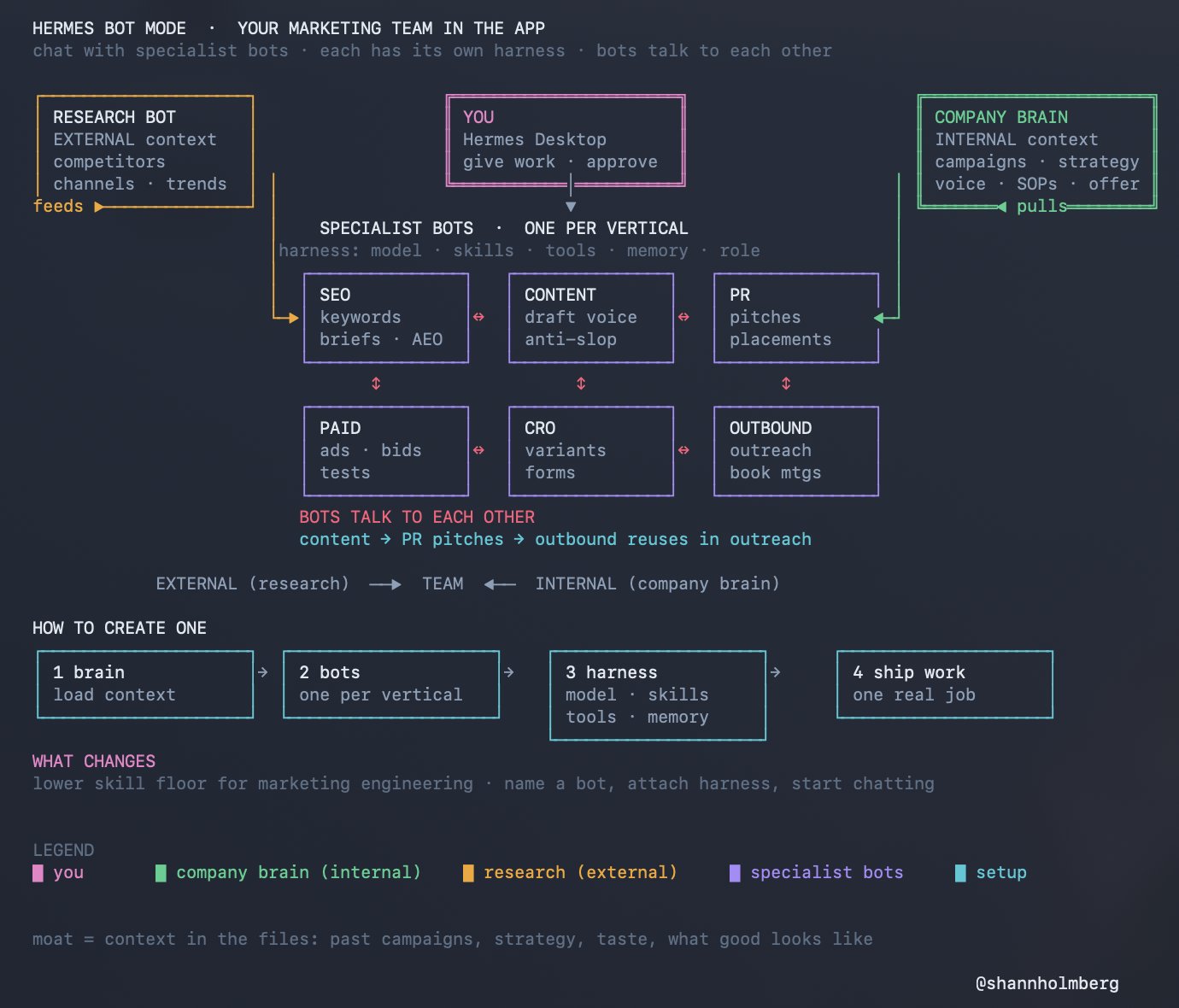
The harness (six knobs)
Packaging is cheap. The moat is what you put in: soul, examples of good, voice rules, and which tools this specialist may touch. Do not clone a seven-Bot “team” on day one.
| Knob | What you set | This lab |
|---|---|---|
| Role | SOUL.md — identity, style, avoid, defaults, hard limits | Analyst (Iris) / Writer (Quill) |
| Model | Pin cheap/fast for throughput; stronger for draft. Inherit if one provider. | Pin if you can; else inherit |
| Skills | Only the howtos this specialist runs | Skip bundled noise |
| Tools | Least privilege | Researcher: web. Writer: no fetch |
| Memory | What this Bot remembers across jobs | Not secrets in SOUL |
| Face | Blob / geometric / upload / AI portrait / pixel pet | Pick one each |
 Open on X
 Safety rules
- Approvals stay manual. Do not turn YOLO on for this lab.
- Least tools. A writer with web fetch will invent a research job.
- No secrets in SOUL, MEMORY,
briefing.md, orbot-roster.md. Shared OAuth is the default — do not paste keys to “give a Bot access.” - Group chats cap at 2–6 Bots and three serial rounds. If a Bot
@users you, that is a judgment call — answer or stop.
Drill A — hire two specialists
- Open Hermes Desktop. Confirm a Bots tab next to Sessions. If missing: Settings → Plugins → Bots, restart.
- New Agent: name
researcher, title Research analyst, description “Sourced bullets only. Label speculation. Never invent citations.” - Advanced: paste the Analyst (Iris) soul from Harness 04. Enable only the web/search tools this Bot needs.
- Give it a blob or geometric face. Pin a cheap/fast model if you have a second provider; otherwise inherit.
- New Agent: name
writer, title Drafting specialist. Paste the Writer (Quill) soul. Disable web fetch. Pin a stronger model if you have one. - Open each Bot Chat. Ask: “Who are you and what are your hard limits?” Confirm they answer in that soul.
Drill B — one @mention handoff
- Pick one real topic you already care about (a book, a local issue, a product you use). Write it in
bot-roster.md. - In the writer Bot Chat, type:
@researcher five sourced bullets on [topic]. No invented citations.Wait — the reply is not instant. - When the bullets land:
@writer 150–200 words in my voice from those bullets. Flag unsourced claims. Write briefing.md in my notes folder. Do not send. - Open
briefing.mdoffline. If it exists only inside the chat, ask writer to write the file with an absolute path you control. - In
bot-roster.md, record: who spoke, which chat the reply appeared in, and whether there was a delay (fire-and-forget is expected).
@ autocomplete resolves against the live roster. Your text is not forwarded verbatim. An unknown @ (or an email) passes through untouched.Drill C — group chat
- Right-click a local Bot → Manage groups (or New Group Chat). Seat only
researcherandwriter. - Open the room. Send one message that mentions both:
@researchercheck the bullets still match the sources;@writerkeep the brief under 200 words. - Watch up to three rounds. Note who replied and who passed. Speaking is optional.
- If the row shows needs you, a Bot escalated with
@user. Answer once, or stop the room. Do not add a third Bot yet.
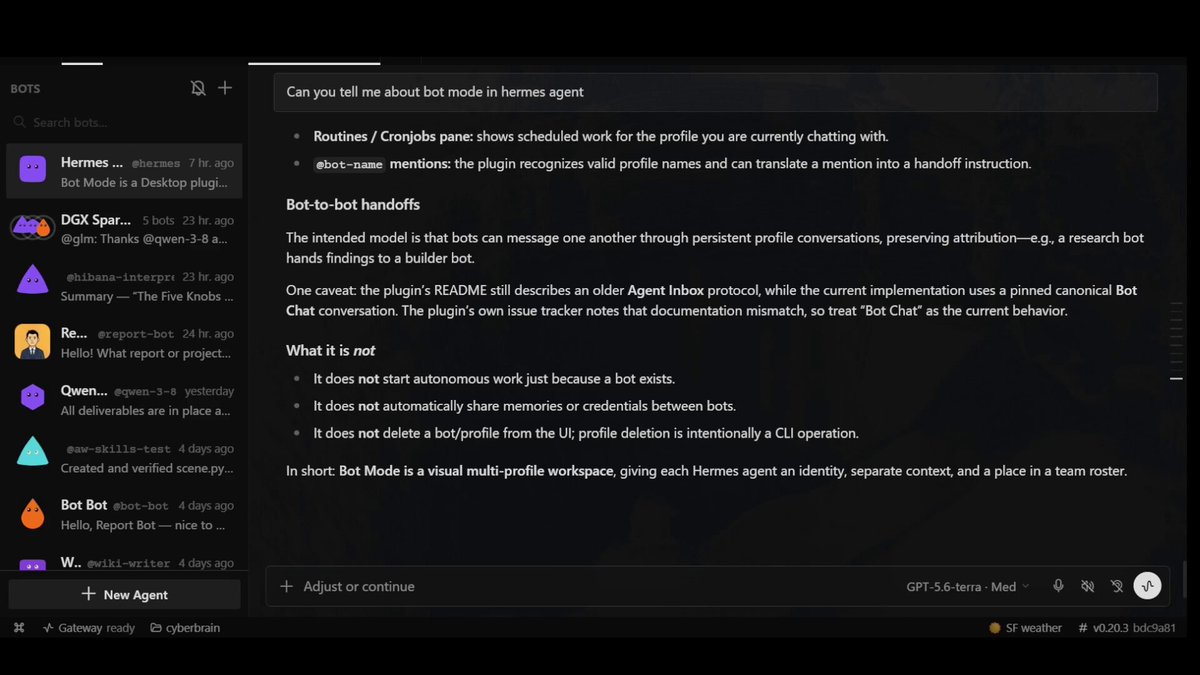
Stretch — a Bot that specifies other Bots
Optional. One operator’s idea is a Bot used only to specify the next specialist from the work in front of you. In this lab the HR Bot writes the spec; you still click New Agent.
 Open on X
 - Optional: New Agent
hr. Short soul: “You specify specialists. You do not run their tools. Output name, title, description, soul sketch (12–20 lines), tools to enable, tools to disable.” - Ask hr, with
briefing.mdin context: “What third specialist would help next, and what must they never do?” - You create that Bot in New Agent from the spec. Log it in
bot-roster.md. Skip this stretch if two Bots already earned the outcome.
hr a mandate to create profiles unattended unless you already know the profile CLI and want that risk. Spec → you hire is the course default.Check yourself
What is a Bot in Hermes Desktop?
Pick one — the answer is revealed straight away.
Researcher has web fetch. Should writer also have it?
Pick one — the answer is revealed straight away.
You type @researcher in the writer chat. When does the reply arrive?
Pick one — the answer is revealed straight away.
The receipt
Copy the sample into your notes. Paths, not tokens. You are done when the checklist is true and briefing.md opens without Hermes.
# bot-roster.md
Date / host: […]
Topic: […]

## researcher
Title: […]
Soul: Analyst (Iris) / other […]
Model pin: […] or inherit
Tools on: […]
Tools off: […]
Face: blob / geometric / other
Hard limits (quoted from chat): […]

## writer
Title: […]
Soul: Writer (Quill) / other […]
Model pin: […] or inherit
Tools on: […]
Tools off: web fetch (required for this lab)
Face: […]
Hard limits (quoted from chat): […]

## Handoff
@researcher → @writer: yes/no
Reply landed in: writer Bot Chat / group / other […]
Delay / fire-and-forget: […]
briefing.md path (offline open): […]